
Nano Banana. Yes, it sounds funny. You might think Google spent months debating the name for one of their strongest image models, but it was far more spontaneous. The Product Manager, Naina, chose it early one morning when they were rushing to publish the model. ‘Some of my friends call me Naina Banana, and others call me Nano because I’m short and I like computers.’ And that was it. One of the most viral image models was born. Nano Banana first launched on LMArena in August, with Google rolling out the Pro version to Google Ads in December. Now, at the end of February, Google has launched its newest image generation model, Nano Banana 2
What is Nano Banana exactly?
Nano Banana is Google’s image generation and editing model. It creates images and lets you make simple, natural changes such as adjusting lighting, removing objects, adding people, adding seasonal context or combining images. Over the past few months, Nano Banana has evolved into a more commercially robust and production-ready tool, with the Pro version improving image quality, prompt accuracy, text rendering and creative control, and Nano Banana 2 delivering faster and more precise image generation. It is now integrated directly into Google Ads.
How to use it inside Google Ads
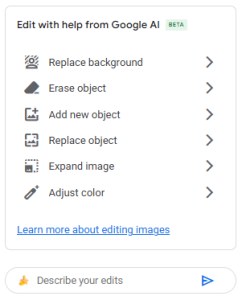
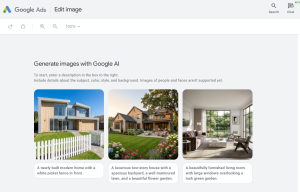
You access Nano Banana’s latest model (2) inside Google Ads through Asset Studio. When you upload or select an image, go into the image editing area and you will see the option to generate or edit with AI. From there you can create new assets or improve the ones you already have.
For existing images, you can change the background, add or remove objects, add people or animals, adjust small details like open windows and refine the whole scene. You can also adapt the image to any season, adding Christmas decorations, summer BBQ elements, different clothing or the right atmosphere for the time of year.
Think about lifestyle images for a display campaign. Instead of organising a photoshoot, you provide the core scene and AI helps you add the rest. This cuts creative lead times and gives you far more variants to test. For eCommerce brands, you can start with the product photo and build the rest of the image with simple prompts.
Limitations to keep in mind
The technology is improving at speed, but it is still not perfect. After testing Nano Banana in Google Ads, these are the main things to watch:
- Quality checks
Always look carefully at lighting, physics, body parts, hands, reflections, and anything involving mirrors or faces looking at each other. When adding objects, especially when working with existing images, the lighting is not always natural and objects can look artificial; adding them can create odd proportions or very bright colours. Even when you prompt the model to tone down bright colours, it does not always respond correctly. Therefore, continuing to refine and adjust your prompts is key.

- Responsible use
In some cases, you may notice demographic bias. When adding people, it may default to a single type of appearance unless you describe who you want. While dogs are not a protected group, vague prompts can still lead to default outputs. For example, when asking to add a dog, the model consistently generates a Golden Retriever unless another breed is specified.

Google’s Generative AI policies apply, including rules on sensitive content, political topics, harmful use and copyright. Overall, this is a sensible limitation.
- Prompting
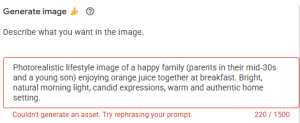
It is common to receive the error message ‘couldn’t generate an asset’ with very simple prompts. Sometimes, when a prompt is straightforward and does not break any rules, the system still fails. It also struggles with long or multi-step instructions, although this should improve over time.
The same issue appears when trying to add children and young people. The tool returns the error message below and doesn’t allow them to be added. This isn’t an issue when using Nano Banana through other platforms, such as Vertex AI.
- Text inside images
This feature is still weak. If your industry relies on price points, this is particularly important. Fonts, colours, and layout can fail to follow brand guidelines consistently. Ideally, Google would introduce a simple “add text” option with controls for font, size, colour, and positioning, which would be far more useful. Attempting to add text as an object is also unreliable.
- Object removal
There is an option to select objects to erase, but it does not work well. It does not always detect all elements in the image, and the brush and rectangle selection tools often return the message ‘couldn’t erase object, try editing another image.’ The most effective way to remove objects is usually by prompting directly and requesting their removal.
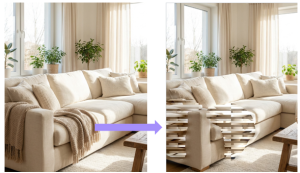
None of this should stop us using it and testing it for brands, but we need to apply strong quality checks, follow responsible use, ensure assets stay on brand and keep prompting until we get what we need.
What makes it really useful
Overall, the technology is very strong, and there are a few things in the tool that really help
- Google’s AI image studio generates multiple image variations from your prompt automatically, which is helpful for comparison and choice. Once you select your preferred version, it automatically resizes the asset into the four required Google Ads ratios and saves all versions to the library.

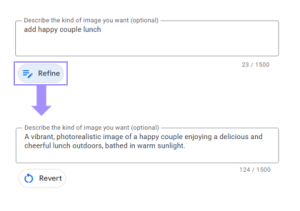
- The ‘refine’ feature helps you improve your prompts by rewriting them into full, well-structured sentences with richer descriptive language. This helps strengthen prompt engineering by adding context, clarity, and detail, which can lead to more accurate and higher-quality outputs.
- Safety is built in. Every image created in Google tools carries SynthID (an invisible watermark). This is important for brand trust, audits and disclosure. You can even ask Gemini to verify if an image was created by Google AI.
Testing creative variations
Nano Banana produces many versions of an image, which makes it useful for structured testing. You can compare different backgrounds, lifestyle scenarios or product arrangements without extra production cost. This sits alongside testing with existing assets too, giving teams a wider mix of creative to understand what drives engagement. You can also test seasonal versions, emotional styles or different levels of detail. This helps performance teams learn what works without waiting weeks for new creative.
Bringing it all together
Using Nano Banana is part of our AI‑assisted creative workflow. It gives brands the chance to test more assets, adapt to seasonality faster and expand creative possibilities across AI‑driven bidding. We combine it with our creative QA guardrails, governance checks, reviews and branded prompt registers. This helps us generate ideas, keep assets on brand and deliver creative for Performance Max and Demand Gen at speed and with consistent quality.
And while Nano Banana is already delivering a lot inside Google Ads, it’s worth knowing that Google isn’t stopping there. Veo 3, Google’s video generation and editing model, is on its way, and once it’s officially announced and available, we’ll follow up with best practices.
If you’d like to explore what this could unlock for your brand or have any questions along the way, get in touch.